Best USB-C Fast Charging Cables in 2026: 5 Picks for Phones & Laptops
The best USB-C fast charging cables are not simply the ones with the biggest wattage number. The right cable matches your phone, tablet or laptop, gives you a practical length and provides enough power headroom for the devices you actually charge.
60W is enough for most phones. 100W+ matters when a laptop joins the setup.
Best everyday pick: Anker 60W 2-Pack. Best for laptops: Anker Prime 240W. Best budget 100W option: UGREEN 100W 2-Pack. Buy based on what you charge, not the biggest number on the package.
Compare the best USB-C fast charging cables

Anker 60W 2-Pack
Best fit for phones, tablets and everyday charging when you want two useful 6-foot cables.
Check Price on Amazon ↗

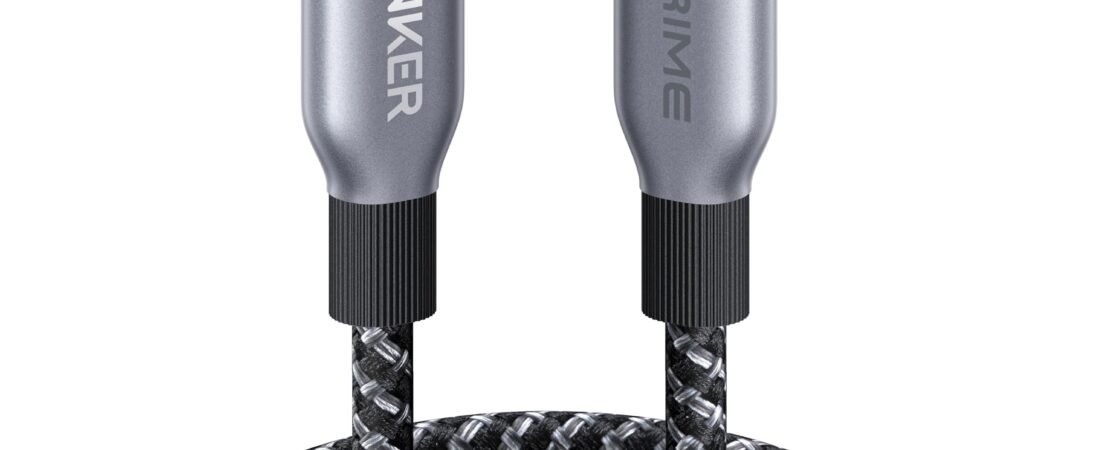
Anker Prime 240W
Best when one cable needs to cover phones, tablets and high-power USB-C laptops.
Check Price on Amazon ↗

UGREEN 100W 2-Pack
A strong value when you want 100W capability without paying premium-cable pricing.
Check Price on Amazon ↗


If you… choose this
| If you… | Start with… |
|---|---|
| Only charge phones and tablets | Anker 60W |
| Charge a USB-C laptop too | Anker Prime 240W |
| Want 100W without spending much | UGREEN 100W |
| Prefer Apple-branded accessories | Apple 60W Woven |
| Need multiple inexpensive 100W cables | JSAUX 100W |
How to choose the best USB-C fast charging cables
What is the highest-power device you charge? That sets the wattage ceiling you actually need. For a phone-first setup, buying far beyond the device’s needs usually adds little practical benefit.
Do you need laptop charging? If no, 60W is usually plenty of headroom. If yes, check the laptop’s charging requirement before choosing between 100W and 240W cables.
How long should the cable be? Longer cables are convenient beside a bed or sofa, while shorter cables keep a desk, travel pouch or car setup cleaner.
Do you need one cable or several? A good 2-pack can be better value when you want one cable at home and another in your bag. If you are building a complete vehicle setup, see our guide to the best USB-C car chargers too.
USB-C fast charging cable wattage: what actually matters
A higher-rated cable does not force extra power into a phone. The charger and device negotiate the charging level. For most phones and tablets, a properly rated 60W USB-C cable already provides comfortable headroom; 100W and 240W become more relevant for laptops and mixed-device setups.
The best USB-C fast charging cables also need to make sense outside the spec sheet. Connector fit, durability, useful length and whether you need a single cable or a multi-pack can have a bigger effect on daily convenience than buying the maximum wattage available.
Also remember that the cable is only one part of fast charging. Your wall or car charger and the device itself must support the appropriate charging standard and power level. A high-wattage cable cannot make an underpowered charger deliver more power.
For most people, the smart buy is a reliable 60W or 100W cable — not the maximum wattage possible.
Start with the device you need to charge, then choose wattage, length and pack size around that use case. Among these best USB-C fast charging cables, the Anker 60W 2-Pack is the easiest everyday starting point; move to 100W or 240W only when your laptop or charging setup gives you a reason.
Check current Amazon options →
Paid link. As an Amazon Associate we earn from qualifying purchases.
Best USB-C fast charging cables: frequently asked questions
Do iPhone and Android need different USB-C cables?Not when both devices use USB-C. The important differences are connector type, supported charging standard and wattage rating.
Will a 240W cable charge my phone too fast?No. The phone and charger negotiate the power level; the cable rating is the maximum it is designed to carry.
Do I need 100W for a phone?Usually not. Higher-rated cables are most useful when the same cable also charges tablets or laptops.
best usb-c fast charging cables: what matters before you buy
A strong buying decision is easier when you separate headline features from the parts that affect everyday ownership. For USB-C fast charging cables, the most useful questions are about power rating, data speed, connector durability, cable length, e-marker support and device compatibility. Those factors usually matter more after a few weeks than launch-day excitement or one standout specification.
Think about the job you want this charging cable buying guide to do. If it solves a problem you face every day, paying more can make sense. If the feature will only be used occasionally, a simpler or older option may deliver better value.
- List the two or three features you will use every week.
- Check compatibility with the devices, apps or accessories you already own.
- Compare the full ownership cost, not only the purchase price.
- Read the return policy and warranty before buying a premium device or accessory.
Who should consider USB-C fast charging cables
This product or comparison is most relevant for buyers who already know the limitation they are trying to fix. Someone upgrading for a specific camera, battery, comfort, portability or ecosystem reason has a clearer path than someone upgrading only because a new model exists.
If your current setup still handles the same tasks comfortably, waiting can be the smarter decision. Consumer tech improves quickly, and skipping one generation often creates a more meaningful upgrade later.
Long-term ownership questions
Before ordering, think beyond the first week. Accessories wear, batteries age, software support changes and some features depend on cloud services or subscriptions. Check which parts of the experience are included permanently and which may create future costs.
Also consider resale value, repairability and how easy it is to replace cables, tips, straps, cases or other wear items. A slightly more expensive product can be easier to own when replacement parts and support are easy to find.
How to compare reviews without getting lost
Different reviewers test different priorities. One may focus on raw performance while another emphasizes comfort, camera output or travel. Look for agreement across several sources, then pay closest attention to the tests that match your own use. A benchmark that never affects your routine should not outweigh a comfort or compatibility issue you will notice every day.
Buying checklist
- Does it solve a problem you have now?
- Does it work with your existing hardware and software?
- Are the most important features available without extra subscriptions?
- Is the size, weight or installation realistic for your routine?
- Would a cheaper model solve the same problem well enough?
Bottom line
Use the comparison to narrow the field, then choose based on the features that affect your real routine. The best purchase is the one that fits your devices, habits and budget without paying for capabilities you will rarely use.
Charging speed and data speed are separate specifications
A cable can support high charging wattage while offering modest data transfer, or it can be built for faster data while carrying less power. Decide whether the cable is mainly for charging, external storage, displays or docking. Buying by the USB-C connector alone is not enough because identical-looking cables can behave very differently.
When an e-marker matters
High-current USB-C cables often include an electronic marker that communicates supported power capabilities. For laptop charging, choose clearly rated cables from reputable brands rather than relying on vague marketplace descriptions.