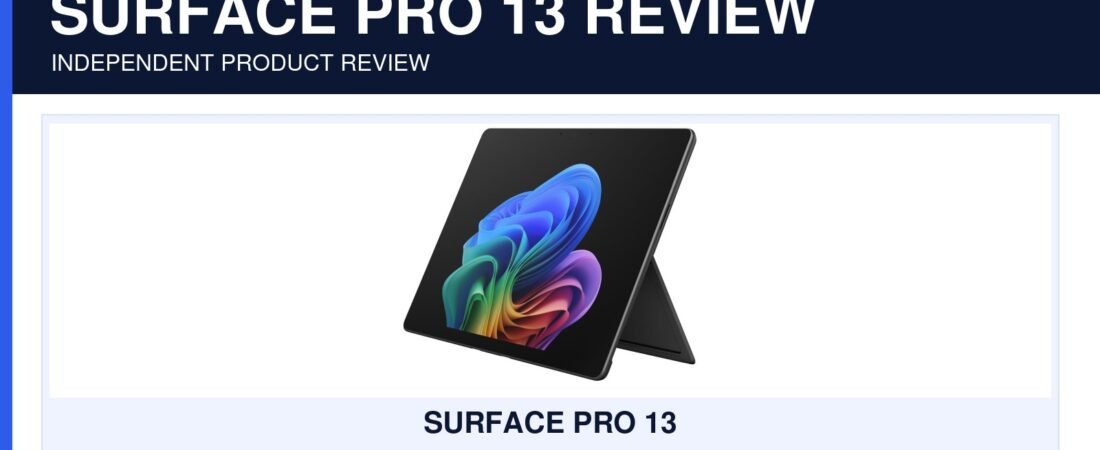
Microsoft Surface Pro 13 Review 2026: Is the Premium 2-in-1 Worth It?
Microsoft Surface Pro 13 review 2026: the 13-inch Surface Pro targets buyers who want a premium Windows laptop and tablet in one device. The new Snapdragon X2 Plus platform raises performance expectations, but the full cost of the keyboard, pen and preferred storage configuration deserves attention.

A strong premium choice for mobile Windows work—especially if you value the 2‑in‑1 format.
The Surface Pro makes sense for professionals, students and travelers who will genuinely use tablet mode, touch and the kickstand. A traditional laptop can offer better value if you always work at a desk and never detach the keyboard.
Microsoft Surface Pro 13 review 2026: flexibility and Windows
Unlike mobile tablets that rely on tablet-first applications, Surface Pro runs Windows 11. That matters for desktop browsers, file management, office tools and specialized software. The built-in kickstand supports a wide range of viewing angles, while the detachable-keyboard approach keeps tablet mode genuinely useful.
According to the official Microsoft Surface Pro specifications, configuration details can vary by model and market. The Snapdragon X2 Plus platform includes a dedicated neural processing unit for Copilot+ features and is paired with 16GB of memory in the highlighted configuration. The important question is not simply whether it is fast; it is whether the applications you depend on run natively and efficiently on Windows on Arm.

Check the complete setup cost
In this Microsoft Surface Pro 13 review 2026, the tablet body is only part of the experience. Many shoppers will also want a compatible keyboard and possibly a Surface Slim Pen. Confirm exactly what the Amazon listing includes because accessories, memory, storage, color and display technology can vary between configurations.
Storage is another practical decision. A 256GB model may be enough for cloud-focused use, but large media libraries, development tools and creative applications can fill it quickly. Moving to 512GB can reduce storage management, though it raises the purchase price.
What works well
- Premium 13-inch touch display and flexible kickstand.
- Full Windows environment in a thin 2‑in‑1 form.
- 16GB memory suits demanding everyday multitasking.
- Strong fit for travel, study, meetings and handwritten notes.
What to consider
- Keyboard and pen may be sold separately.
- Windows on Arm compatibility should be checked for specialist apps.
- Upgrading storage can increase total cost quickly.
- A conventional laptop may be more comfortable for all-day typing.
Who is the Surface Pro 13 for?
The Microsoft Surface Pro 13 review 2026 points to four especially suitable buyer profiles.
Mobile professionals: the kickstand, touch input and compact form are useful for presentations, flights and flexible workspaces.
Students: one device can handle typed assignments, research, video calls and handwritten notes when paired with the right accessories.
Creative and note-taking users: the pen-friendly design is more versatile than a conventional clamshell laptop.
Windows-first buyers: it is attractive when an iPad feels too limited but a traditional laptop feels too rigid. You can also explore our latest mobile accessories and buying guides when planning a complete portable setup.
Five checks before choosing a configuration
List the applications you cannot replace: confirm native Windows on Arm support or acceptable emulation performance. Price the accessories together: add the keyboard, pen, sleeve, dock and charger configuration before comparing it with a premium laptop. Choose storage for three years: local photos, development tools and creative assets can make 256GB feel restrictive.
Decide between LCD and OLED: display options can affect image quality, battery behavior and cost. Consider desk ergonomics: the kickstand is excellent on a table but may be less comfortable than a rigid laptop base on a lap. The right Surface Pro is not automatically the most expensive version; it is the configuration that supports your essential software and includes the accessories you will use without forcing another major purchase soon afterward.
Premium and versatile, but calculate the entire kit before buying.
The Surface Pro 13 earns its premium position through flexibility rather than raw specifications alone. It is most valuable when you use touch, tablet mode and pen input regularly. Confirm application compatibility and the included accessories, then choose storage based on a realistic multi-year workload.
View Surface Pro 13 on Amazon →
Paid link. As an Amazon Associate, Mobile Gear Picks earns from qualifying purchases at no additional cost to you. Price, configuration and availability can change.
Frequently asked questions
Does the Surface Pro include the keyboard?
Bundles differ. Read the exact “what’s included” section on the retailer page; do not assume that the keyboard or pen is included with every configuration.
Can the Surface Pro replace a laptop?
As explained in our Microsoft Surface Pro 13 review 2026, for many office, study and browser-based workflows, yes. Buyers who need specialized Windows software should verify Windows on Arm support before relying on it as their only computer.
Is 256GB enough?
It can work for cloud storage and lighter applications. Buyers keeping large local files, games or creative projects should compare a 512GB configuration.
Microsoft Surface Pro 13 review 2026: what matters before you buy
A strong buying decision is easier when you separate headline features from the parts that affect everyday ownership. For Microsoft Surface Pro 13, the most useful questions are about keyboard and pen workflow, battery needs, app compatibility, display size, ports and whether it can replace your laptop. Those factors usually matter more after a few weeks than launch-day excitement or one standout specification.
Think about the job you want this 2-in-1 PC to do. If it solves a problem you face every day, paying more can make sense. If the feature will only be used occasionally, a simpler or older option may deliver better value.
- List the two or three features you will use every week.
- Check compatibility with the devices, apps or accessories you already own.
- Compare the full ownership cost, not only the purchase price.
- Read the return policy and warranty before buying a premium device or accessory.
Who should consider Microsoft Surface Pro 13
This product or comparison is most relevant for buyers who already know the limitation they are trying to fix. Someone upgrading for a specific camera, battery, comfort, portability or ecosystem reason has a clearer path than someone upgrading only because a new model exists.
If your current setup still handles the same tasks comfortably, waiting can be the smarter decision. Consumer tech improves quickly, and skipping one generation often creates a more meaningful upgrade later.
Long-term ownership questions
Before ordering, think beyond the first week. Accessories wear, batteries age, software support changes and some features depend on cloud services or subscriptions. Check which parts of the experience are included permanently and which may create future costs.
Also consider resale value, repairability and how easy it is to replace cables, tips, straps, cases or other wear items. A slightly more expensive product can be easier to own when replacement parts and support are easy to find.
How to compare reviews without getting lost
Different reviewers test different priorities. One may focus on raw performance while another emphasizes comfort, camera output or travel. Look for agreement across several sources, then pay closest attention to the tests that match your own use. A benchmark that never affects your routine should not outweigh a comfort or compatibility issue you will notice every day.
Buying checklist
- Does it solve a problem you have now?
- Does it work with your existing hardware and software?
- Are the most important features available without extra subscriptions?
- Is the size, weight or installation realistic for your routine?
- Would a cheaper model solve the same problem well enough?
Bottom line
Use the comparison to narrow the field, then choose based on the features that affect your real routine. The best purchase is the one that fits your devices, habits and budget without paying for capabilities you will rarely use.