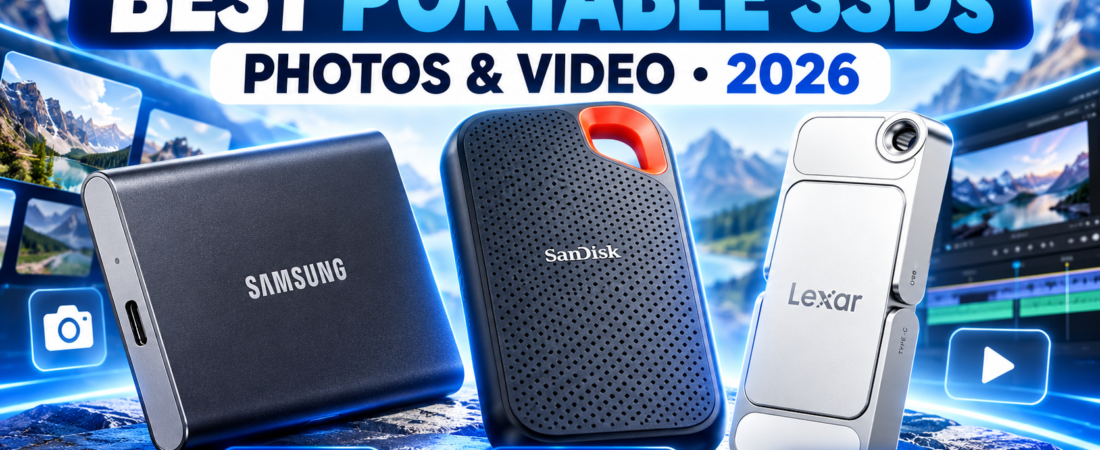
2026 buying guide | fast portable storage
Need faster storage for RAW photos, 4K footage, phone video or laptop backups? The right portable SSD should match your real USB speed, capacity needs and travel habits, not just the biggest number on the box.
Affiliate disclosure: As an Amazon Associate, Mobile Gear Picks earns from qualifying purchases. Product images and Amazon listings below are supplied through our Hostinger affiliate integration by ASIN. Prices and availability can change.
How we chose the best portable SSDs for photos and video
The best portable SSDs for photos and video are not simply the models with the highest advertised benchmark. For creators, a useful drive has to balance transfer speed, capacity, heat management, portability, connector compatibility and a price that makes sense for the workload. We also look at how clearly the listing explains interface requirements, because a 2,000 MB/s drive connected to a slower port can perform much closer to a 1,000 MB/s model.
These picks are based on current manufacturer and Amazon listing information surfaced through the Hostinger affiliate tools on this site. We do not claim hands-on lab testing. Always confirm the exact capacity, generation and compatibility on the live listing before buying.
BEST OVERALL
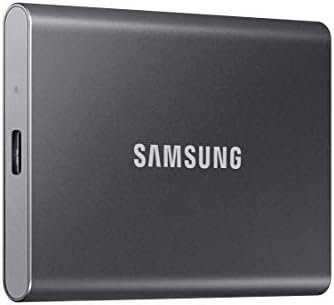
Samsung T7
A balanced pick for backups, photo libraries and everyday creator storage. The current listing advertises up to 1,050 MB/s read and 1,000 MB/s write over USB 3.2 Gen 2.

BEST FOR TRAVEL
SanDisk Extreme 2TB
The listing emphasizes up to 1,050 MB/s read, 1,000 MB/s write, IP65 water and dust resistance, and up to 3-meter drop protection. That makes it attractive for camera bags and field work.

BEST DUAL-CONNECTOR PICK
Lexar D70E
The current listing advertises up to 2,000 MB/s read and 1,800 MB/s write over a compatible USB-C connection, plus built-in USB-C and USB-A connectors for easier device switching.
Portable SSD comparison at a glance
| Model | Best for | Advertised speed | What to check first |
|---|---|---|---|
| Samsung T7 | Everyday backups and creator files | Up to 1,050 MB/s read | Your port needs USB 3.2 Gen 2-class bandwidth to get close to the rated speed. |
| SanDisk Extreme | Travel, field work and rugged use | Up to 1,050 MB/s read | Confirm the exact generation, capacity, current firmware and warranty details on the listing. |
| Lexar D70E | Compact multi-device use | Up to 2,000 MB/s read over supported USB-C | Your host must support the required USB interface or the drive will run slower. |
How fast does a portable SSD really need to be?
For ordinary photo backups, moving documents and storing a general media library, a modern portable SSD around the 1,000 MB/s class already feels dramatically faster than a traditional portable hard drive. The difference becomes more important when you move hundreds of gigabytes, work with large RAW catalogs, edit high-bitrate video or record directly to external storage.
Headline speed is only one part of the story. Sustained writes can slow after a cache fills, and compact drives can reduce speed when they get hot. That is why the best portable SSDs for photos and video should be judged by the whole workflow rather than one benchmark number.
USB-C is a connector, not a speed guarantee
Two ports can look identical and support very different data rates. A USB-C port may run at 5 Gb/s, 10 Gb/s, 20 Gb/s or another standard depending on the computer or mobile device. If you buy a high-speed drive and connect it through a slower hub or cable, the slowest part of the chain becomes the limit.
If your laptop is short on ports, our guide to the best USB-C hubs for laptops explains why port specifications matter. If you are also replacing cables, see our USB-C cable guide and make sure the cable supports the data rate you need, not only charging power.
1TB vs 2TB: which capacity makes sense?
Capacity is where many buyers under-estimate their future needs. One terabyte can be a practical starting point for a photographer, a student or anyone moving documents and phone video. Two terabytes is easier to justify when you shoot 4K video, maintain a large RAW library, store game captures or keep multiple project folders on the same drive.
When comparing the best portable SSDs for photos and video, think in months rather than in today’s free space. If a typical shoot creates 80GB and you keep ten projects locally, a 1TB drive can become tight surprisingly quickly after working files, previews and exports are included. Leaving free space also makes organization easier and gives the drive room for temporary data.
Can you edit video directly from a portable SSD?
Yes, many modern portable SSDs are fast enough for direct editing, especially for common 4K codecs, proxy workflows and single-stream projects. The exact requirement depends on codec, bitrate, number of streams, effects and the software you use. A fast SSD does not fix a slow CPU or GPU, but it can remove storage as the obvious bottleneck.
For demanding projects, connect the drive directly to the fastest compatible port instead of routing it through an unknown hub. Use a cable rated for the required data speed and keep the drive ventilated during long exports or transfers.
Phone and tablet compatibility
Newer USB-C phones and tablets can often read portable SSDs directly, and some creator-focused phones support external recording. Power requirements, file system, app support and cable quality still matter. If the phone disconnects the drive or refuses to mount it, the problem may be power delivery or formatting rather than the SSD itself.
For mobile video, a compact drive with a short cable or an integrated connector can be easier to manage than a larger enclosure hanging from the phone. Verify your exact phone model before relying on external recording for an important shoot.
Heat and sustained performance matter more than they look
Portable SSDs can become warm during long transfers. That is normal, but very small enclosures sometimes reduce performance to keep temperature under control. If your routine includes copying 300GB or 500GB at a time, independent sustained-transfer testing is more useful than a short peak-speed result.
Durability: desk drive or camera-bag drive?
If the SSD stays beside a laptop on a desk, you may not need to pay extra for water resistance or a rugged shell. If it travels in a backpack, gets used outdoors or moves between cameras and laptops, physical protection becomes much more valuable. The SanDisk Extreme listing, for example, highlights IP65 resistance and drop protection, while the Samsung T7 focuses more on compact aluminum construction.
No rugged rating replaces a backup. A drive can be physically tough and still be lost, stolen, corrupted or accidentally erased.
One portable SSD is storage, not a backup plan
This is the most important rule in the guide. Moving the only copy of your photos from a memory card to one SSD does not create redundancy. Important files should exist in at least two places, and irreplaceable work is safer when one copy is stored separately from the main computer and travel bag.
A simple creator backup routine
Keep the working copy on your computer or primary SSD, make a second copy to another drive or trusted cloud service, verify the files, and only then consider formatting the camera card. Fast storage saves time, but redundancy protects the work.
Which of these portable SSDs should you buy?
Choose the Samsung T7 if you want the simplest all-round pick and your priority is dependable everyday portable storage rather than chasing the highest possible interface speed.
Choose the SanDisk Extreme if the SSD will spend a lot of time in a camera bag, outdoors or on the road and the rugged features matter more than having the highest advertised number.
Choose the Lexar D70E if you like the built-in USB-C and USB-A approach, move between multiple device types and have hardware capable of taking advantage of its higher advertised USB-C transfer rate.
For most shoppers, the best portable SSDs for photos and video are the models that fit the devices they already own. Paying for 2,000 MB/s makes little sense if every computer in your workflow tops out at a slower interface.
FAQ about portable SSDs for creators
Is 1,000 MB/s fast enough for photo and video work?
For many photographers and 4K video creators, yes. A 1,000 MB/s-class SSD is already fast enough for backups, large file transfers and many editing workflows. More speed helps only when the rest of your setup can use it.
Should I buy 1TB or 2TB?
Choose 1TB for lighter photo libraries, documents and occasional video. Choose 2TB if you regularly shoot 4K footage, RAW photos or keep several active projects on the drive.
Can I use a portable SSD with iPhone or Android?
Often yes with newer USB-C devices, but compatibility depends on the exact phone, power requirements, app support and file system. Check your device documentation before buying specifically for direct recording.
Is exFAT the best format?
exFAT is convenient when a drive must move between Windows and macOS, but it is not the only choice. Your editing software, backup strategy and device support should determine the format.
How long do portable SSDs last?
There is no single lifespan that applies to every SSD. NAND endurance, controller behavior, workload, temperature and physical treatment all matter. Even a reliable SSD can fail, which is why a second copy remains essential.
Bottom line
The best portable SSDs for photos and video are fast enough for your actual port, large enough for the next few years of files, and practical enough to carry every day. Samsung T7 is the easiest all-round pick here, SanDisk Extreme is the travel-oriented option, and Lexar D70E gives you a compact dual-connector alternative with higher advertised USB-C speed.
How this guide was prepared
This guide was researched and drafted with AI assistance, then reviewed for clarity, internal consistency and useful buying context. Product specifications, images and Amazon links were checked against the current Hostinger affiliate product data by ASIN. We do not claim hands-on laboratory testing. Verify the live Amazon listing before purchase because specifications, prices and availability can change.
Amazon Associate disclosure: Mobile Gear Picks may earn from qualifying purchases made through the product links above.