2026 BUYING GUIDE · USB-C POWER
The best 100W GaN chargers can replace several bulky power bricks with one compact adapter for a laptop, phone, tablet and accessories. The trick is choosing the right ports and power-sharing behavior, not simply the biggest wattage printed on the box.
Affiliate disclosure: As an Amazon Associate, Mobile Gear Picks earns from qualifying purchases. Prices and availability can change.
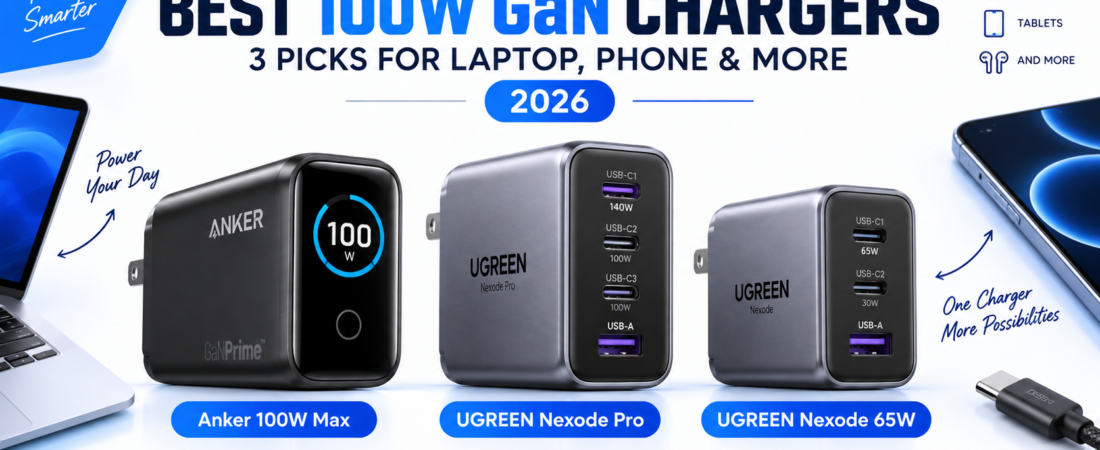
Best 100W GaN chargers: three practical choices to compare
These three models cover three different needs. Only the Anker below is a true 100W model. The UGREEN 160W and 65W options are included deliberately as step-up and step-down alternatives so you can see whether you really need 100W before spending more.
| Charger | Maximum output | Ports | Best for | Main trade-off |
|---|---|---|---|---|
| Anker 100W Max | 100W | 3 ports | Laptop + phone travel kits | Fewer ports than larger desktop chargers |
| UGREEN Nexode Pro | 160W total | 4 USB-C + 1 USB-A | Several high-power devices | Larger and more power than many people need |
| UGREEN Nexode | 65W | 3 USB-C + 1 USB-A | Ultrabooks, tablets and phones | Not enough for some larger laptops under heavy load |
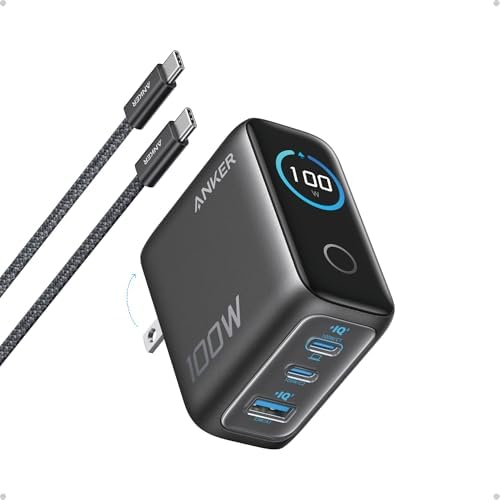
Anker 100W Max USB-C GaN Charger
The Anker 100W Max is the closest match to what most shoppers mean when they search for the best 100W GaN chargers: one compact adapter that can replace a laptop brick while still handling smaller devices.
- 100W from a USB-C port: Anker lists up to 100W output on either USB-C port when conditions allow, making it suitable for many USB-C laptops.
- Three-port layout: the charger combines USB-C charging with an additional port for a phone, watch, earbuds or another accessory.
- Smart display: the front display can show charging status, temperature and port activity, which is useful when you want to know whether a device is actually receiving high power.
- Compact travel design: the foldable plug and roughly 2.72 × 2.17 × 1.34-inch body make it easier to carry than many traditional laptop adapters.
- Low-current mode: the charger can adapt when a low-power accessory is connected rather than treating every device like a laptop.
Who should buy it: travelers, remote workers and MacBook/USB-C laptop owners who want a true 100W-class charger without carrying a large desktop power station.

UGREEN Nexode Pro 160W GaN Charger
This is not a 100W charger, and that is exactly why it is useful in this comparison. If you are looking at the best 100W GaN chargers because you want to charge a laptop plus several other devices, a 160W unit may give you more breathing room.
- 160W total output: the charger is designed for heavier multi-device loads than a standard 100W block.
- Up to 140W on a high-power USB-C port: useful for compatible larger laptops that can take advantage of USB PD 3.1 power levels above 100W.
- Five ports: four USB-C ports plus one USB-A port make it much easier to consolidate a desk or travel kit.
- Smart display and touch control: it can show total output, per-port power, charging protocol and internal temperature information.
- Automatic power allocation: the charger redistributes available power as devices are connected and disconnected.
Who should buy it: people charging a high-power laptop, phone, tablet and accessories from one outlet, especially if 100W total would feel restrictive.

UGREEN Nexode 65W 4-Port GaN Charger
The 65W Nexode is the option to consider if you discover that the best 100W GaN chargers are more power than your everyday devices actually require. Many thin-and-light laptops, tablets and phones fit comfortably within a 65W charging setup.
- 65W maximum output: enough for many MacBook Air-class laptops and other efficient USB-C notebooks.
- Four ports: three USB-C ports plus one USB-A port give you more connection flexibility than many compact 65W adapters.
- Compact body: UGREEN lists the charger at roughly 2.64 × 1.65 × 1.5 inches, useful for travel bags and crowded power strips.
- Foldable plug: easier to pack without exposed prongs catching on cables or pockets.
- GaN thermal efficiency: the design aims to deliver higher power from a smaller enclosure while managing heat and electrical protection.
Who should buy it: buyers with a lighter USB-C laptop, phone, tablet and accessories who care more about compact size and multiple ports than maximum laptop wattage.
How to choose the best 100W GaN chargers for your devices
The best 100W GaN chargers are not automatically the smallest or the ones with the most ports. Start with the device that needs the most power, then work backward from there. If your laptop accepts 65W, a 100W charger gives you useful headroom for a second device. If your laptop can draw 100W by itself, a 100W total charger may have very little power left for a phone when both are connected.
1. Check the single-port output
A charger can advertise 100W total without giving 100W from every USB-C port. Read the port labels and the manufacturer’s power table. Usually one USB-C port is designated as the primary high-power output.
2. Check the multi-port power split
This is the detail that causes the most confusion. A charger may provide 100W with one cable connected, then switch to a split such as laptop-first plus a smaller phone allocation when a second device is added. If you regularly charge two or three devices together, the multi-port combinations matter more than the single headline number.
3. Use the right USB-C cable
High-wattage charging also depends on the cable. A weak or older cable can bottleneck a perfectly capable charger. If you need a cable for a laptop setup, see our guide to the best USB-C fast charging cables. For official background on how USB Power Delivery negotiates power between a charger and device, the USB-IF Power Delivery overview explains the standard and the newer power levels above 100W.
4. Think about where you charge
For travel, a foldable plug and compact footprint may matter more than a fifth port. For a desk, a larger high-output charger can be more stable and can replace several wall adapters. If you need charging away from an outlet rather than from the wall, our guide to USB-C power banks for laptops is the more relevant comparison.
Why GaN matters in a 100W charger
Gallium nitride allows charger designs to switch power efficiently at high frequencies, helping manufacturers build smaller high-wattage adapters than many older silicon designs. GaN does not magically make a charger cool to the touch, though. A compact 100W or 160W charger can still become warm under sustained load. Good thermal management is part of the design, not an optional extra.
Do the best 100W GaN chargers work with every laptop?
No. The best 100W GaN chargers are ideal for many USB-C laptops, but some gaming laptops and mobile workstations need more than 100W or rely on a proprietary connector. Check the laptop’s input requirements before replacing the original adapter. A charger can safely negotiate a lower power level with compatible USB-C devices, but it cannot make a laptop designed for a much higher power brick perform identically under heavy load.
100W vs 65W vs 160W: which level makes sense?
Choose 65W if your main computer is an efficient ultrabook and your other devices are phones, earbuds and tablets. Choose 100W if you want one charger to replace a typical laptop brick while leaving more flexibility for another device. Choose 160W if you routinely charge several high-power products at once or own a laptop that can benefit from USB PD power above 100W.
This is why a list of the best 100W GaN chargers is more useful when it includes the neighboring power classes. Sometimes the smartest purchase is discovering that you need less power, or that you should step up before buying twice.
Best 100W GaN chargers FAQ
Will a 100W charger damage my phone?
Normally, no. Compatible USB-C devices negotiate the power they need rather than simply accepting the charger’s maximum rating. Use reputable chargers and suitable cables.
Can I leave a GaN charger plugged in?
Quality chargers are designed for normal standby use, but always follow the manufacturer’s guidance and replace damaged equipment.
Is 100W enough for a MacBook or Windows laptop?
For many models, yes, but requirements vary. Check the laptop’s recommended adapter wattage and USB-C Power Delivery support.
Why does charging slow down when I connect a second device?
Multi-port chargers share a fixed total power budget. Connecting another device can trigger a new power split, so the laptop may receive less than it did when it was the only device connected.
Bottom line
For most people searching for the best 100W GaN chargers, the Anker 100W Max is the most straightforward fit because it delivers the category’s target wattage in a compact three-port design. Choose the UGREEN 160W if you need substantially more multi-device headroom, or the UGREEN 65W if portability and lighter laptop charging matter more than the 100W number.
How we prepared this guide
This guide uses current product data supplied through the connected Hostinger Affiliate/Amazon integration, including product images and listed feature information. We then organized those specifications around the practical questions buyers face: maximum output, port count, power sharing, travel size and device compatibility. We do not claim hands-on laboratory testing, and specifications can change, so verify the current Amazon listing and manufacturer details before purchase.