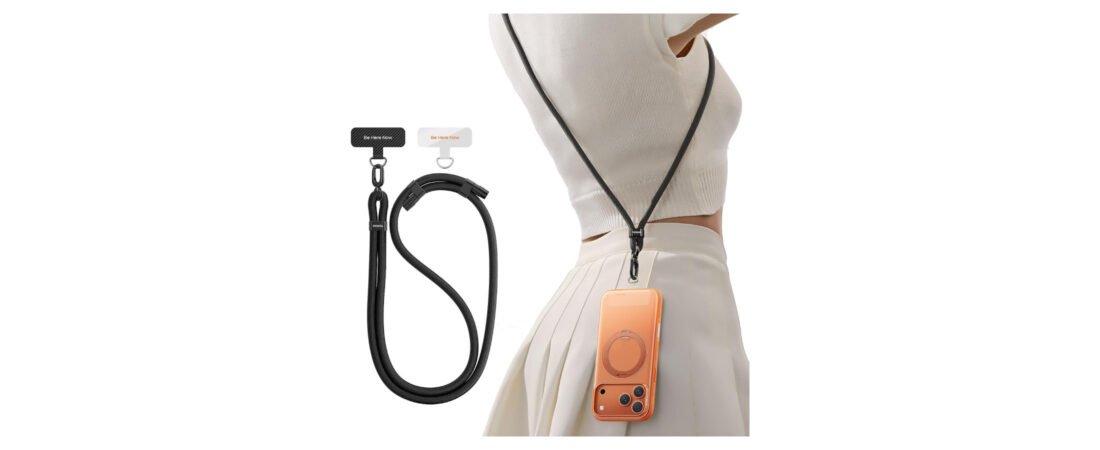
Best Phone Lanyards & Crossbody Straps in 2026: 3 Practical Picks
A good phone lanyard keeps your device accessible while freeing both hands. The details that matter are the tether connection, hardware, strap adjustment and compatibility with your case.
VVAAGG suits straightforward travel use, while SURPHY offers more color choices. Inspect the tether tab and clips regularly because they carry the full weight of your phone.
Affiliate disclosure: We may earn a commission from qualifying purchases through links on this page, at no extra cost to you. Availability and included accessories can change.
Our 3 phone-lanyard picks

Best overall design
TORRAS Phone Lanyard Crossbody
A clean adjustable setup with metal-style hardware and tether tabs for compatible full-coverage cases.
- Adjustable crossbody length
- Multiple attachment pieces
- Polished everyday appearance

Best for travel
VVAAGG Cell Phone Lanyard
A practical strap for keeping a phone close during airports, sightseeing, events and daily errands.
- Long adjustable strap
- Hands-free crossbody wear
- Check the included connector

Best style selection
SURPHY Phone Lanyard Crossbody
A more expressive choice for shoppers who want the strap to feel like part of an outfit.
- Multiple color choices
- Adjustable wearing length
- Tether-tab attachment
Quick comparison
| Pick | Best for | Style |
|---|---|---|
| TORRAS | Everyday use | Minimal |
| VVAAGG | Travel | Simple |
| SURPHY | Color variety | Fashion-oriented |
How the tether system works
Most universal lanyards use a thin tab placed inside a phone case. A small loop passes through the charging-port opening and connects to the strap clip. The closed case, rather than glue on the phone, keeps the tab in position.
This works best with a sturdy case that has a closed bottom edge. Open-bottom cases may not securely trap the tab. A thick tab can also make a cable connector fit tightly, so test charging gently after installation.
What to check before buying
Hardware: examine the clip, swivel, adjuster and connection points. Metal hardware can feel more substantial, but assembly quality matters too.
Length: confirm the adjustment range if you plan to wear it over a coat. A wrist strap is compact; crossbody wear provides better hands-free access.
Compatibility: look for a solid case edge and enough port clearance. Do not attach a bare phone unless the product is specifically designed for it.
Inspect the connection regularly
A lanyard is a convenience accessory, not fall-proof equipment. Check the tab for tearing, the cord for fraying and every clip for complete closure. Replace worn parts and avoid swinging the phone.
Which wearing style is best?
Crossbody: helpful for travel, walking and shopping. Adjust it so the phone does not bounce against hard objects.
Neck: offers quick access but may feel uncomfortable with a heavy phone. Avoid places where a strap could catch on moving equipment.
Wrist: useful for photography and short errands, although it is not fully hands-free.
Our verdict
TORRAS is the strongest all-around option here for its polished adjustable design. VVAAGG suits shoppers seeking a straightforward travel strap, while SURPHY offers more visual personality. The best choice is the one that fits your case securely and feels comfortable in daily use.
Frequently asked questions
Will a lanyard work with every case?
No. Universal tabs generally need a case with a closed bottom edge. Check the case opening and manufacturer instructions.
Can I charge with the tether installed?
Often yes, but thick tabs can make some connectors fit tightly. Never force a cable into the port.
Is it theft-proof?
No. Keeping the phone attached may discourage a quick grab, but straps and clips can still be cut, opened or damaged.
Related guides
Selections are based on product design, intended use and practical buying criteria. We do not claim hands-on durability testing unless explicitly stated.
best phone lanyard: what matters before you buy
A strong buying decision is easier when you separate headline features from the parts that affect everyday ownership. For phone lanyards and crossbody straps, the most useful questions are about anchor strength, strap width, adjustability, case compatibility, comfort and quick access. Those factors usually matter more after a few weeks than launch-day excitement or one standout specification.
Think about the job you want this phone carry accessory guide to do. If it solves a problem you face every day, paying more can make sense. If the feature will only be used occasionally, a simpler or older option may deliver better value.
- List the two or three features you will use every week.
- Check compatibility with the devices, apps or accessories you already own.
- Compare the full ownership cost, not only the purchase price.
- Read the return policy and warranty before buying a premium device or accessory.
Who should consider phone lanyards and crossbody straps
This product or comparison is most relevant for buyers who already know the limitation they are trying to fix. Someone upgrading for a specific camera, battery, comfort, portability or ecosystem reason has a clearer path than someone upgrading only because a new model exists.
If your current setup still handles the same tasks comfortably, waiting can be the smarter decision. Consumer tech improves quickly, and skipping one generation often creates a more meaningful upgrade later.
Long-term ownership questions
Before ordering, think beyond the first week. Accessories wear, batteries age, software support changes and some features depend on cloud services or subscriptions. Check which parts of the experience are included permanently and which may create future costs.
Also consider resale value, repairability and how easy it is to replace cables, tips, straps, cases or other wear items. A slightly more expensive product can be easier to own when replacement parts and support are easy to find.
How to compare reviews without getting lost
Different reviewers test different priorities. One may focus on raw performance while another emphasizes comfort, camera output or travel. Look for agreement across several sources, then pay closest attention to the tests that match your own use. A benchmark that never affects your routine should not outweigh a comfort or compatibility issue you will notice every day.
Buying checklist
- Does it solve a problem you have now?
- Does it work with your existing hardware and software?
- Are the most important features available without extra subscriptions?
- Is the size, weight or installation realistic for your routine?
- Would a cheaper model solve the same problem well enough?
Bottom line
Use the comparison to narrow the field, then choose based on the features that affect your real routine. The best purchase is the one that fits your devices, habits and budget without paying for capabilities you will rarely use.
The anchor tab is the weak point to inspect
Many crossbody straps connect through a thin tab placed inside the phone case. Check that the tab does not block the charging port and that the case still closes correctly. A strong strap cannot protect the phone if the attachment tab or case opening tears under load.
Comfort matters on longer walks
Wider straps spread pressure better than thin cords when a heavy phone is carried for hours. Adjustable length also matters if you switch between over-the-shoulder and crossbody use or wear the strap over a coat.
Safety and quick release
A crossbody phone strap should hold securely but still be easy to remove when it catches on something. Check the hardware for sharp edges and make sure clips close fully. For crowded travel, keeping the phone in front of your body can also make it easier to monitor.
If the strap is used around children, sports equipment or moving machinery, avoid loose loops that can snag.