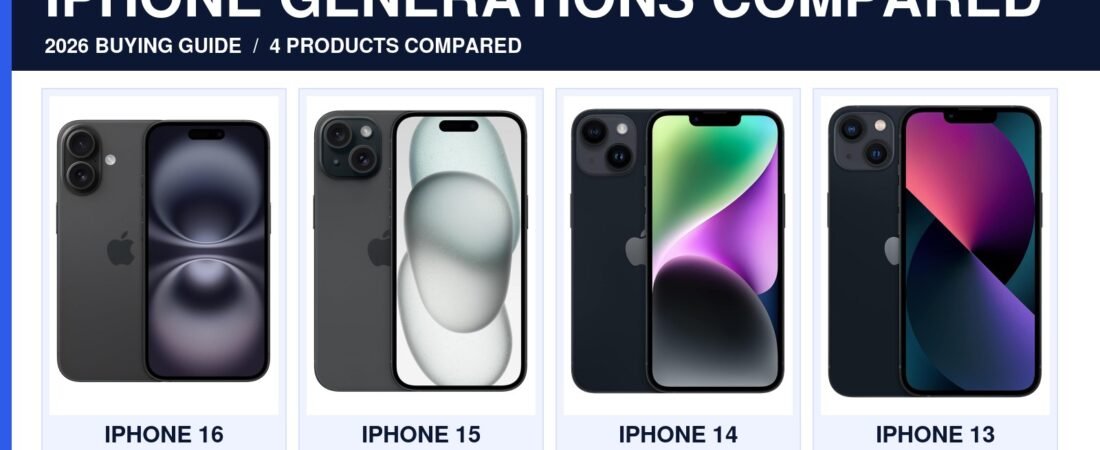
iPhone 16 vs 15 vs 14 vs 13: Which One Should You Actually Buy in 2026?
Apple keeps shipping new iPhones every year, but that doesn’t mean the newest one is the right buy for everyone. I’ve spent a lot of time comparing spec sheets and real owner reviews across all four models, and if you’ve been staring at the lineup trying to figure out whether to grab the latest iPhone 16, save some money on a 15 or 14, or go as far back as the still-solid iPhone 13, you’re not alone — the older models often make more sense than people expect.
This guide breaks down what actually changes between generations, where the real value is, and which model fits which kind of buyer — without the usual “just buy the newest one” advice that ignores your budget.
Updated August 2026 · As an Amazon Associate, I earn from qualifying purchases at no additional cost to you.
OUR #1 PICK

iPhone 14
Same core performance as the 13, still fully supported by iOS, and consistently one of the best price-to-performance iPhones you can buy right now. This is the one we’d tell a friend to buy.
Quick Comparison: iPhone 16 vs 15 vs 14 vs 13
| Model | Best For | Price Tier | Chip | Camera | Display |
|---|---|---|---|---|---|
| iPhone 16 | Latest features, best long-term support | $$$$ | A18 | 48MP Fusion, Camera Control button | 6.1″ OLED |
| iPhone 15 | Best balance of price and features | $$$ | A16 Bionic | 48MP main sensor | 6.1″ OLED, Dynamic Island |
| iPhone 14 | Sweet spot for value | $$ | A15 Bionic | 12MP dual camera | 6.1″ OLED, notch |
| iPhone 13 | Cheapest modern iPhone | $ | A15 Bionic | 12MP dual camera | 6.1″ OLED, notch |
Prices fluctuate — always check the current listing for exact pricing.
iPhone 16: Best If You Want the Latest and Longest Software Support
ud83cudd95 Longest Software Support
The iPhone 16 is the one to get if you plan on keeping your phone for five-plus years and want the longest runway of iOS updates. The Camera Control button is a genuinely useful addition once you get used to it, and the A18 chip has enough headroom to stay smooth well past its first few years.
What stands out:
- Newest A18 chip — the most future-proof option in this lineup
- Camera Control button for quick photo adjustments
- Longest expected software support window
Keep in mind: You’re paying a real premium for features most people won’t notice day to day.
Best for: Buyers who upgrade infrequently and want the newest phone to last as long as possible.

iPhone 15: The Best Balance of Price and Features
The iPhone 15 brought Dynamic Island and USB-C to a more affordable price point, and a year or more after release it’s often the pick that makes the most financial sense. You get nearly all the everyday experience of the newest iPhone without paying the newest-model premium.
What stands out:
- Dynamic Island and USB-C charging
- 48MP main camera, a real jump over the 14 and 13
- Usually discounted meaningfully once the 16 has been out a while
Keep in mind: No Camera Control button, and the chip is a generation behind the 16.
Best for: Anyone who wants a modern iPhone experience without paying flagship pricing.

iPhone 14: The Sweet Spot for Value
This is one of the models that keeps showing up on best-seller lists years after launch, and it’s easy to see why. The iPhone 14 still runs the latest iOS smoothly, still takes great photos, and comes in well below what a 15 or 16 costs. If you don’t care about Dynamic Island or USB-C, it’s hard to beat.
What stands out:
- Same A15 chip as the 13, still fast for everyday use
- Reliable dual-camera system
- Consistently one of the best price-to-performance iPhones available
Keep in mind: Still uses Lightning, not USB-C, and lacks Dynamic Island.
Best for: Buyers who want a modern, reliable iPhone without spending flagship money.
iPhone 13: The Cheapest Way Into a Modern iPhone
ud83dudcb0 Best Budget Pick
The iPhone 13 is proof that a few-year-old flagship can still hold up. It shares its chip with the 14, still gets current iOS updates, and is consistently the most affordable way to get a genuinely modern iPhone experience — which is exactly why it keeps selling well in the US market even now.
What stands out:
- Lowest price of entry in this comparison
- Still receives current iOS updates
- Same core performance as the iPhone 14
Keep in mind: Battery health matters more on an older unit — check the battery capacity listing before buying.
Best for: Budget-conscious buyers who want the cheapest realistic entry into the iPhone ecosystem.

How to Choose: What Actually Matters
If you want the newest features and longest support: iPhone 16.
If you want the best all-around value with modern extras: iPhone 15.
If you want the best price-to-performance without compromise: iPhone 14.
If budget is the deciding factor: iPhone 13.
Frequently Asked Questions
Is it worth paying more for the iPhone 16 over the 14?
Only if you plan to keep the phone for many years or want the Camera Control button and newest chip. For most everyday use, the 14 covers the same core experience.
Do older iPhones still get security updates?
Yes — Apple typically supports iPhones with the latest iOS version for around five to six years after release, so all four models here are still fully supported.
What’s the biggest jump between generations?
The move from the 14 to the 15 (Dynamic Island, USB-C, better camera) is more noticeable day-to-day than the jump from 15 to 16.
Should I buy refurbished or new?
Either can work, but if buying an older model like the 13, check the battery health percentage listed — anything below 85% will noticeably affect daily use.
Whichever generation fits your budget, all four of these iPhones are still solid, well-supported choices in 2026. If you want to dig into the full technical specs yourself, Apple’s own iPhone comparison tool is a good place to double-check the details before buying.
To sum up the iPhone 16 vs 15 vs 14 vs 13 decision: pick based on budget and how long you plan to keep the phone, not just which one is newest.
You Might Also Like
This post contains affiliate links. As an Amazon Associate, we earn from qualifying purchases at no additional cost to you. Read our full Affiliate Disclosure.